Mobile Canvas
Watch the device your agent drives, live in a browser tab. Your taps there land in the same journal as your agent's commands.
Try it autonom canvas serve --platform android --serial emulator-5554 --transport auto
Needs a session on one target · Autonom installed, with Node
How it works
autonom canvas serve starts a small web server for the session's target. It listens on 127.0.0.1 only. The URL it prints carries a random token after the #. The page trades that token for a cookie once, then removes it from the address.
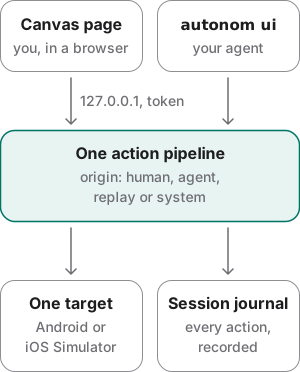
Canvas shows the device and passes your input on. Taps, swipes, keys and text go through the same code as the command line. Each action lands in the same session journal, marked with where it came from: human, agent, replay or system.
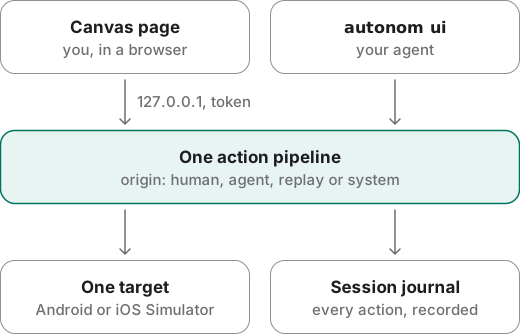
Frames come back by the best path the target has. On Android, auto prefers the device's own video, turned into a stream by ffmpeg, and falls back to screenshots. An iOS Simulator is always mirrored from screenshots.
What the page shows
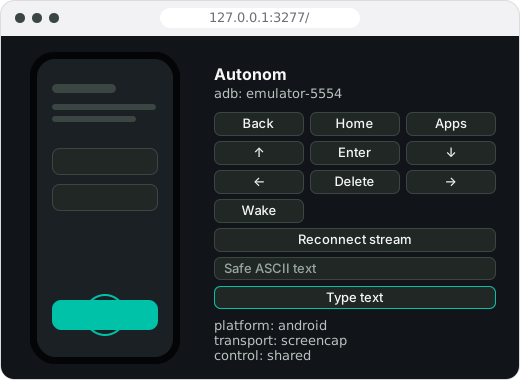
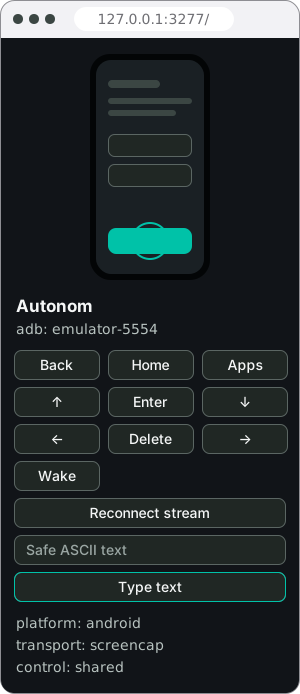
The device fills one side of the page. The panel beside it names the target and offers the device keys, a text field and a status block.
- Input. Tap, drag, scroll as a swipe, Back, Home, Enter, Delete, the arrow keys, wake, and plain ASCII typing.
- Status. The platform, the stream, frames sent, viewers, the display size and who holds control.
- Control. Control starts shared: Canvas accepts input from every origin. It can pause Canvas input, or let one origin take over until it releases. This gates Canvas input only, never
autonom uicommands. - Reconnect. Use it after a rotation, or when the device's recording stops.
Examples
Canvas needs a real emulator or Simulator, so its outputs here are examples. The process listing comes from Autonom's test device; the commands are in Reproduce these outputs, after the examples.
Watch an Android emulator from your agent's browser
Goal: see the app your agent drives, live, in the browser panel beside it.
- Own the target and launch the app.
The session names the emulator, and the app is running before you watch it.
autonom session start --platform android --serial emulator-5554 --launch --app-id com.example - Serve Canvas.
Name the platform and the emulator's serial from
autonom devices, hereemulator-5554.autopicks the best stream this machine has. Leave it running.autonom canvas serve --platform android --serial emulator-5554 --transport auto - Open the printed URL.
Open that exact URL in the browser panel, then check that frames advance in the status block.
You should see a ready line and a local URL with a token after the #.
What to look at. The token sits after the #. The page trades it once for a cookie and removes it from the address, so a link you share later carries no token.
Mirror an iOS Simulator
Goal: watch a booted Simulator the same way.
- Serve Canvas for the Simulator.
Put your Simulator's UDID from
autonom devicesafter--target. iOS is always mirrored from screenshots, so ask forscreencap.autonom canvas serve --platform ios --target AAAAAAAA-1111-2222-3333-BBBBBBBBBBBB --transport screencap
You should see the same three lines, naming the Simulator.
What to look at. Taps, drags and plain text go through the same input path as autonom ui. Canvas converts the Simulator's pixels to points for you. The Android key buttons have no iOS match, so they are refused.
Make sure Canvas stops with the session
Goal: leave nothing running when the work is done.
- See what is running.
A running Canvas appears under
background.autonom processes - Stop the session.
It stops every process the session started, Canvas included.
autonom session stop - Clean up after a crash.
If a process was killed hard,
cleanupstops what it left behind.autonom cleanup
With no Canvas running, you should see every list empty.
What to look at. background is where a running Canvas pair shows up: the supervisor and its node process. A group whose leader is gone is only reported in group_remnants, never stopped.
Reproduce these outputs
From the root of an Autonom d0f7211 checkout, in bash or zsh. Autonom's test device stands in for the emulator. canvas serve needs a real emulator or Simulator, so its lines above are an example of what it prints.
Good to know
- Canvas is not a second runner. Its input uses the same code and journal as the command line. A person's tap is recorded with the origin
human. - An open page is not a working stream. Check that frames advance before you call the setup done.
- Choose what to tap with ui, not pixels. Finding elements belongs to the screen commands. Canvas is for watching and light control.
- It is not a measurement tool. For a careful manual review, use scrcpy. For performance claims, use Macrobenchmark, Perfetto or Flutter profile mode.
- Never expose it. Anyone with a forwarded port and the token can drive the device. Treat any tunnel to it as full device control.
- The token stays out of listings.
processesanddoctornever show a Canvas token or its command line. - Record what you watched. Keep a screenshot of the panel, the platform and target, the stream, the app, the build, who held control and the flow you replayed.
Reference
One command starts Canvas. Its flags pick the target, the stream and how the page is protected.
| Command | What it does |
|---|---|
autonom canvas serve | Starts Canvas for the session's target, supervised and registered to the session. |
autonom canvas serve --platform android --serial <adb-serial> --transport auto | Mirrors one named Android target. |
autonom canvas serve --platform ios --target <simulator-udid> --transport screencap | Mirrors one booted iOS Simulator. |
--transport auto|screenrecord|screencap | auto prefers video and falls back. screenrecord fails loudly without video. screencap streams screenshots and needs no ffmpeg. |
--port N | The local port. The default is 3277. |
--fps N | Frames per second asked of the video stream, 1 to 60. The default is 15. |
--token TOKEN | Uses your token instead of a random one. |
--no-auth | Turns the token off. Only for local debugging on a machine no one else can reach. |
autonom processes | Lists what Autonom started. A running Canvas is under background. |
autonom session stop | Ends the session and every process it owns, Canvas included. |
Android and iOS differences
Android gets a video stream; the iOS Simulator is mirrored from screenshots. On both, Canvas is for seeing and light control.
| Capability | Android | iOS Simulator |
|---|---|---|
| Frames | Video, turned into a stream, or screenshots | Screenshots, polled |
screenrecord stream | Yes, with ffmpeg | No |
Raw video at /stream.h264 | Yes | No |
| Tap, drag and plain text | Yes | Yes, through idb or AXe |
| Back, Home and arrow keys | Yes | Refused |
Next steps
You can watch the device your agent drives and step in when you need to.