Network
See what your app really sent, and make its server fail on purpose to check what the user sees.
Try it autonom network start --i-understand-mitm
Needs Autonom installed, with mitmproxy · a session on an emulator or Simulator you own
How it works
network start runs a local mitmproxy for your session. It listens on 127.0.0.1 only, and no flag widens it. network attach points the target at it: an Android emulator reaches it through 10.0.2.2, and on the iOS Simulator, apps launched by session launch get proxy variables.
Each request is stored with its credentials already masked. You list requests, open one, follow new ones as they arrive and export them all as HAR 1.2.

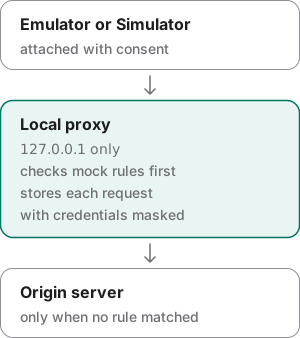
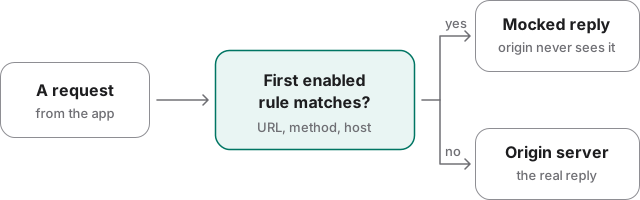
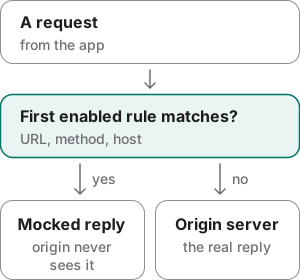
Mock rules sit in front of the server. A request that matches the first enabled rule gets a made-up response and never reaches the server. A rule fires only while the proxy is attached. Rules live in one registry on your Mac, so they survive restarts.
Note
Starting the proxy, attaching a target and installing a CA each need their own flag, every time. On an interactive terminal you also type a confirmation phrase. Use them only on devices and apps you own or may test.
Examples
Each output below comes from Autonom’s test device, or is marked as an example. Open Reproduce these outputs at the end for the exact commands.
Force a backend failure and check the UI
Goal: make the login request fail with a 500 and prove from the screen what the user sees.
- Add the rule.
Put your login endpoint’s full address in place of
.../v1/login; a rule needs no device.autonom network mock add --url '.../v1/login' --status 500 --json '{"error":"x"}' - Start the proxy.
The flag is your consent to decrypt and record this session’s traffic.
autonom network start --i-understand-mitm - Attach the target and trust the CA.
The rule fires only once the target sends its traffic through the proxy, and HTTPS needs the CA.
autonom network attach --i-understand-mitm --install-ca - Repeat the action.
Tap the control that sends the login request, as on Read and drive the screen.
autonom ui tap --desc "Log In" - Find the error message.
Search for it in your app’s own words.
autonom ui find --desc "Something went wrong" - Capture it.
The screenshot records that a rule was active, as Evidence explains.
autonom screenshot --task login --label "500 error state" - Switch the rule off.
--allneeds no id, and the rule stays in the registry for next time.autonom network mock disable --all - Detach the target.
The device gets back the proxy setting it had before.
autonom network detach - Stop the proxy.
The session’s proxy shuts down.
autonom network stop
You should see the new rule and its id after step 1, then your app’s error message in step 5.
What to look at. m_1 is the id that mock list, the screenshot and each faked request carry. A rule given with --url matches that one address and ignores the query, so ignore_query is true.
Show full output
See what the app actually sent
Goal: find the login request your app sent and read it with its credentials masked.
- Start the proxy.
It runs for your session only.
autonom network start --i-understand-mitm - Attach the target and trust the CA.
Without the CA, HTTPS requests pass through still encrypted.
autonom network attach --i-understand-mitm --install-ca - Filter the requests.
Walk the journey in the app, then narrow the list by host and status.
autonom network requests list --host api.example.com --status 401 - Open one.
Pass an id from the list; here it is
f_0003.autonom network requests show f_0003 - Keep the evidence.
Every request goes into the session as HAR 1.2, with credentials redacted.
autonom network export
You should see the matching requests, then one request with its authorization header and password masked.
What to look at. The authorization header and the password are <redacted> on disk, not only on screen. mocked says whether a rule made the answer up.
Check that no stale rule shapes the evidence
Goal: make sure no rule from an earlier session is faking responses before you trust a capture.
- Read the network status.
It counts active rules even when no proxy is running.
autonom network status - List the rules.
See what each enabled rule matches.
autonom network mock list - Switch them all off.
disablekeeps the rules for later;clearwould delete them.autonom network mock disable --all
You should see one active rule and a persistent_mocks_active warning, with no proxy running.
What to look at. active is 1 and the warning is raised before any proxy starts. A response from that rule would look exactly like a real one.
Show full output
Start a capture only with consent
Goal: see what Autonom does when a privileged command runs without its consent flag.
- Start the proxy without the flag.
Autonom refuses and says what it would have done.
autonom network start - Start it again with consent.
The flag is needed every time; nothing is remembered.
autonom network start --i-understand-mitm
You should see a refusal with exit code 2 and consent_required, naming the flag it needs.
What to look at. error_code is the stable value to branch on, listed with the others in Safety and errors. The hint names the exact flag to add.
Reproduce these outputs
From the root of an Autonom d0f7211 checkout, in bash or zsh. The target is Autonom’s own test device, so no emulator is needed; ids and times differ on every run. The request in See what the app actually sent is an example from Autonom’s network skill, because it needs a real app.
Good to know
- A rule fires only while the proxy is attached. Rules answer requests that pass through the session’s proxy. Start and attach before you repeat the action.
- Check
mocks.activebefore you trust a capture. Rules persist across sessions and reboots.network start,network statusanddoctorraisepersistent_mocks_active, andrequests list --mocked trueshows which requests were faked. - Disable rules; clear only to delete.
mock disable --allstops every rule and keeps it for tomorrow.mock clearthrows them all away. - Consent is never cached. Every privileged command needs its flag each time. No environment variable, config file or earlier grant stands in for it.
attached: unknowndoes not mean it works. Only traffic from the target counts; acurlfrom your Mac through the proxy never does. The iOS Simulator shares the Mac’s network, so it staysunknown.- A native Android app must trust the CA.
--install-caputs it in the user store of a rootable emulator. The app also needs a debug network security config that trusts user CAs. - Flutter needs a way in.
dart:ioignores Android’s global proxy and the proxy variables. Boot a rootable emulator through the proxy and attach with--system-ca, or add a proxy hook to the debug build. - Pinning wins, by design. A pinned app’s requests fail, and there is nothing to inspect. Use a debug build with pinning relaxed; Autonom does not bypass it.
- A preview is not a payload. Bodies are 2 KiB previews unless the capture started with
--capture-bodies, and a HAR says so inlog.comment. A list stops at 50 and reportstruncated. - Credentials are masked before they are written. Sensitive headers, credential-shaped body fields and sensitive query keys become
<redacted>, so an archived session never held them.
Reference
Mock rules need no session and no device; everything else acts on the session’s one target.
| Command | What it does |
|---|---|
autonom network start --i-understand-mitm | Starts the session’s proxy on 127.0.0.1. --port fixes the port; --capture-bodies keeps full bodies. |
autonom network attach --i-understand-mitm | Points the target at the proxy. --install-ca trusts the CA; --system-ca puts it in a rooted emulator’s system store. |
autonom network status | Reports the proxy, whether the target is attached, request counts and active rules. |
autonom network detach | Gives the device back the proxy setting it had before. |
autonom network stop | Stops the session’s proxy. |
autonom network requests list | Lists captured requests, newest first, 50 by default. Filter with --host, --method, --status, --path, --since or --mocked. |
autonom network requests show <id> | Shows one request. --full needs a capture started with --capture-bodies. |
autonom network requests follow | Prints each new request as it arrives, until --max or --max-seconds. |
autonom network mock add | Adds a rule. --url matches one address exactly and ignores the query; --match takes a glob. |
autonom network mock list | Lists enabled rules; --all adds the disabled ones. |
autonom network mock disable --all | Switches every rule off and keeps it. enable switches rules back on. |
autonom network mock clear | Deletes every rule. |
autonom network export | Writes the session’s requests as HAR 1.2 with credentials redacted; --har picks the path. |
Android and iOS differences
Autonom never changes your Mac’s network settings itself. On iOS, the steps network attach prints set the Mac’s system proxy, so ask whoever owns the Mac first.
| Capability | Android | iOS Simulator |
|---|---|---|
| Capture with no app change | Yes: a rootable emulator booted through the proxy, verified on API 34 and later | No |
| Proxy for the app | Native apps with a debug network security config | Partly: apps that read proxy variables; not URLSession |
| Physical device | Refused: the proxy is loopback-only | Simulator only |
| Target traffic told apart | Yes, from the emulator’s network | No: it shares the Mac’s network |
| Installing the CA | Needs adb root; not on Play Store images | Simulator keychain; kept after detach |
| Response mocking | Yes | Partly |
On emulators below API 34 the system-store path is built but not yet verified on a device.
Next steps
You can see what your app sent and make its server fail on purpose.