Flows
Save a journey that worked once as a file your agent replays on every change. A mistake is refused with its line and column, and a failed run tells you how to fix the file.
Try it autonom flow check flows/login.yaml
Needs Autonom installed · a session on one target
How it works
A flow is a YAML file: a short header, one --- line, then a list of steps. It lives in your app repository, usually under .autonom/flows/, and you review it like code.
Each step names its control with a selector: what the control says, or its id, as on Read and drive the screen. Selectors are exact, so a step that matches two controls refuses to act.
flow check reads a file without a device. flow run replays it on the target your session owns. Checks on screen poll until their timeout. A tap, typed text or an opened link fires exactly once.
The exit code says what went wrong. 0 means the flow passed. 1 means a check on screen failed. 2 means the file or the machine is wrong, and the error names a stable code from Safety and errors.
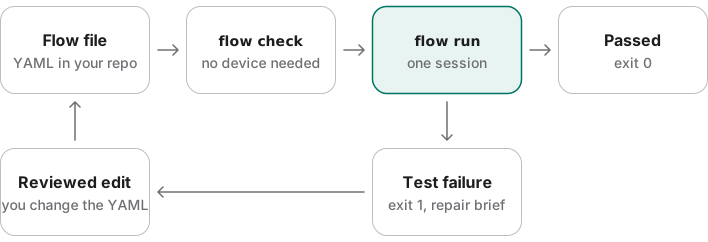
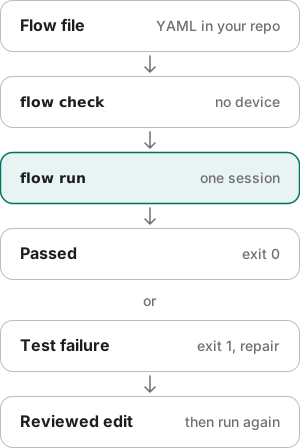
A run keeps the screenshots, screen trees and logs its file asks for, as evidence. To get a flow without writing YAML, record one with Teach on App memory.
Examples
Every output here comes from a fake Android device that ships with Autonom's tests, so you can reproduce it without an emulator. Open Reproduce these outputs at the end of this section for the exact commands.
Catch a mistake before it reaches a device
Goal: find a broken flow in seconds, on any machine.
This flow:
- Opens the app from a clean start (
launchApp). - Taps the control labeled Sign in with Email (
tapOn,visibleText). - Asks for
match: exactly, which is not a match mode.
- Check the file.
The check reads the file and every
runFlowchild, with no device.autonom flow check flows/login.yaml
You should see the check refuse the file and point at the typo.
What to look at. line 9 and column 14 point at the typo, and hint names the closest legal spelling. The command exits 2 with flow_selector_invalid, because the file is wrong, not the app.
Run the smoke suite and explain a failure
Goal: replay every smoke flow and tell a broken flow from a broken app.
- Start a session.
Flows run on the one target your session owns.
autonom session start - Run the suite.
A folder run is a suite on that target.
autonom flow run .autonom/flows --include-tag smoke --exclude-tag flakyThis command:
- Runs every flow under
.autonom/flows. - Keeps the flows tagged
smoke(--include-tag). - Skips any flow tagged
flaky(--exclude-tag).
- Runs every flow under
- Build the report.
It folds every run of the session into one page, failures first.
autonom report suite
You should see one flow pass, one fail, and exit code 1.
What to look at. "ok": true means the suite ran; status and exit code 1 say it failed. The failed run’s flow_assertion_timeout comes with failure_class: test_failure, which means the asserted state never held: either the app changed or the flow's selector is wrong. Here the repair block's top candidate shows the label in the description, so the selector is wrong.
Show full output
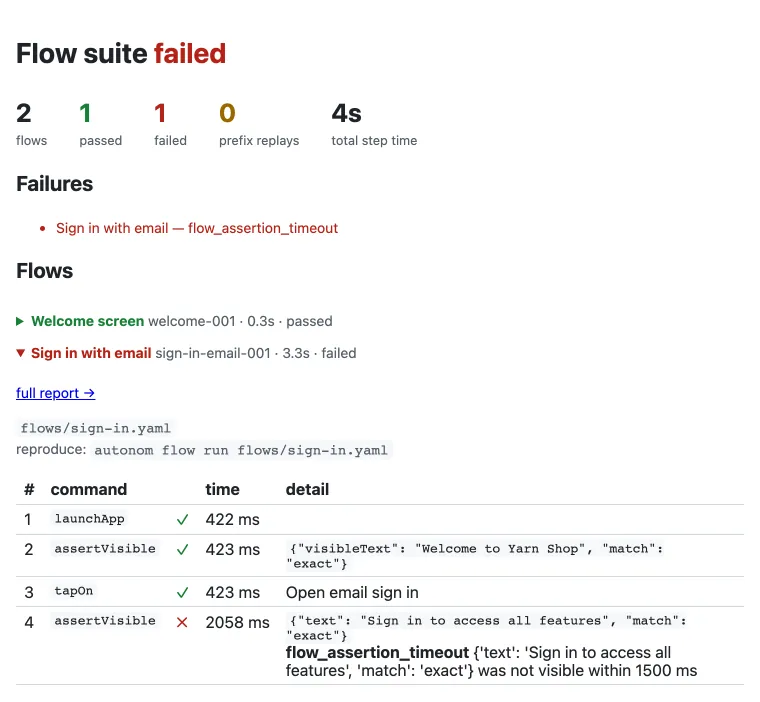
Repair a failed flow
Goal: fix sign-in.yaml with the commands its repair block printed.
- Replay the prefix.
Paste the first line of
repair.commands: it runs steps 1 to 3 and stops where step 4 began.autonom flow run /private/tmp/flows-demo/app/.autonom/flows/sign-in.yaml --until-step 3 - Read the screen.
Dump the tree the failed step saw.
autonom ui tree - Confirm the top candidate.
Its own command finds exactly one node, by its description.
autonom ui find --desc 'Sign in to access all features' --mode exact --case-sensitive - Change one line.
Swap
textforvisibleText, which matches the label wherever the platform keeps it.- text: Sign in to access all features + visibleText: Sign in to access all features - Check the flows.
Check the whole folder, so both files pass again.
autonom flow check .autonom/flows - Run the suite again.
Replay every flow, not just the prefix.
autonom flow run .autonom/flows --include-tag smoke --exclude-tag flaky
You should see both files check clean and both flows pass.
What to look at. status is passed, and the run exits 0. The fix was one line you reviewed; Autonom never rewrites a flow for you.
Bring a Maestro flow across
Goal: reuse a Maestro flow you already have, as a checked Flow v1 file.
- Convert the file.
Import writes Flow v1 and leaves the Maestro file as it was.
autonom flow import maestro.yaml --out autonom.yaml - Check what it wrote.
The check follows every
runFlowchild, so import each child too; paths stay relative.autonom flow check autonom.yaml
You should see the import succeed and the check pass, for Android only.
What to look at. platforms lists only android, because the flow's launchApp clears the app's data, a step only Android runs. Maestro's text became visibleText, and Welcome.* became an anchored match: regex.
Show autonom.yaml
Reproduce these outputs
From the root of an Autonom d0f7211 checkout, in bash or zsh. Ids, times and paths differ on every run.
Good to know
- Exit 1 means the app or the flow; exit 2 means the file or the machine. A test failure means the asserted state never held. Read its evidence and its repair block before you retry.
- Taps fire once; checks poll. A tap is never retried on its own, and a selector that matches two controls refuses to act.
tapOnwithrepeatis a declared number of taps, not a retry. - Prefer
visibleTextfor flows that run on both platforms. Android views keep a label intext. Flutter and iOS keep it in the accessibility description.visibleTextmatches either. - Selectors match only what is on screen. A step never checks or taps a node iOS lists at a 0x0 frame.
indexcounts on-screen matches only, so a selector unique on Android stays unique on iOS. - Never put credentials in a flow. Reference
${TEST_PASSWORD}and pass--secret TEST_PASSWORD. An--envvalue that reaches asensitive: trueslot is treated as a secret too. - Wait for a still screen before you tap a sheet that slides in.
waitForSettledwaits until the tree holds still and never fails the flow. Check the state you need withwaitUntil. launchAppstarts fresh. It clears the task on Android and stops the app first on iOS. Addresume: trueto continue a journey.- The repair brief suggests; it never rewrites. Each candidate comes with the
ui findcommand that confirms it. The edit is yours to review and commit.
Reference
Every command prints JSON. Check, format, list and import work without a device; run needs a session.
| Command | What it does |
|---|---|
autonom flow check <path> | Checks one file or a folder, runFlow children included. A mistake comes back with its line, column and error code. |
autonom flow fmt <file-or-dir> | Prints the canonical form, with shorthand such as tapOn: Sign in expanded. --write saves it. |
autonom flow list [path] | Lists each flow's file, id, name, tags and the platforms it can run on. |
autonom flow run <file-or-dir> | Runs a file, or a folder as a suite, in the active session. --include-tag and --exclude-tag filter a suite. |
--secret NAME | Passes a secret by name. Its value never enters the run's files. |
--until-step N | Replays the flow through step N and leaves the target in that state. |
autonom flow create --from-session <ID> | Compiles a session you walked into a checked flow, reusing selectors proven unique. |
autonom flow import <path> [--out PATH] | Converts a Maestro flow into Flow v1. |
autonom flow export <file> --format maestro | Writes a Maestro flow, and refuses anything Maestro cannot express the same way. |
autonom report build | Renders one run as a self-contained report.html and a JUnit report.xml. |
autonom report suite | Folds every run of the session into suite.html and suite.xml, and exits 1 when a flow failed. |
autonom proof --base <REF> | Picks the flows that cover a diff, runs them and writes a one-screen verdict. |
Android and iOS differences
The language is the same on both platforms. A few steps, and what the device reports, differ.
| Capability | Android | iOS |
|---|---|---|
back, clearState, setOrientation, a KEYCODE_* key | Run | Refused before any step runs; a suite skips the flow and lists it under skipped_flows |
The focus check before inputText | Waits for the field with keyboard focus | Waits for a text field on screen, because the tree has no focus flag |
launchApp | Opens the launcher activity on a cleared task | Stops the app, then launches it |
A recorded session clear | Compiles into the flow | Skipped with a warning; declare a reset in setup instead |
Next steps
You can write, check, run and repair a flow.