App memory
Your agent learns an app once and reuses what it learned. Notes stay on your machine, and approved flows are shared with your team as an App Skill.
Try it autonom teach start login
Needs Autonom installed · a session on one target · a flow you can replay
How it works
A device task needs things the command line cannot know: which backend the app talks to, how its network is wired, where its response schemas live. The mobile-memory skill keeps them per app. Your agent reads them before a device task and writes back what will happen again.
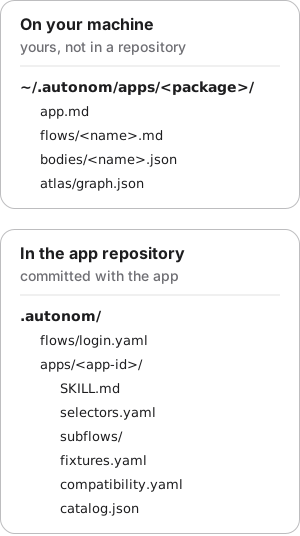
They live in ~/.autonom/apps/<package>/ as plain Markdown on your machine. They are yours alone, never in the app repository or in Autonom's.
app.md: the app's identity, backend, network, TLS notes, where schemas live, known screens and gotchas already handled.flows/<name>.md: a runbook with a goal, the endpoint, the schema source, exact steps, how to verify, and gotchas.bodies/<name>.json: a ready response a runbook points at, for a network mock.atlas/graph.json: the screens your runs saw and the moves between them, written byautonom atlas update.
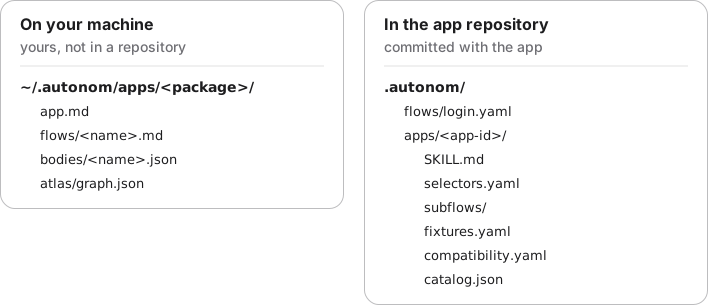
A runbook that has become fully predictable, with stable selectors and no judgment calls, can become a flow that Autonom checks and replays exactly.
Teach records part of the session journal and compiles it into a flow. Approval needs three clean replays in a row, by default. Promotion copies the approved flow into the App Skill, under .autonom/apps/<app-id>/.
An App Skill has a fixed, portable layout: SKILL.md, selectors.yaml, subflows/, fixtures.yaml, compatibility.yaml and catalog.json.
Examples
The four examples are one journey on a fake Android device that ships with Autonom's tests, so you can reproduce them without an emulator. Open Reproduce these outputs at the end of this section for the exact commands.
Find what your agent already knows about an app
Goal: start a device task with the answers the last session found.
- Show the session.
The app id it names is the key to the app's notes.
autonom session show
You should see the session, with the app id it was started for.
What to look at. app_id names the app's folder under ~/.autonom/apps/. The mobile-memory skill reads app.md there first, then follows a matching runbook, so your agent replays the known path instead of exploring.
Teach a flow by walking it
Goal: turn a journey you just walked into a candidate flow, without writing YAML.
- Start a recording, then walk the journey.
Name the recording, here
login. Then tap and find controls by what they say; the last find becomes the flow's closing check.autonom teach start login - Stop the recording.
This closes the range in the session's journal.
autonom teach stop - Compile the range.
It writes a flow file, here
.autonom/flows/login.yaml.autonom teach compile --out .autonom/flows/login.yaml
You should see a two-step candidate flow that still needs review.
What to look at. confidence is 0.5 and review_required is true, so read the file and run it before anything approves it. Both steps matched a control by its description, which quality counts.
Show full output
Show the flow it wrote

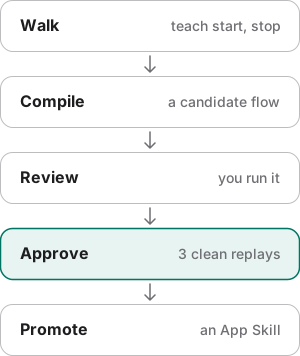
Approve a flow and share it as an App Skill
Goal: prove a flow replays cleanly, then share it with your team.
- Approve it.
With
--run, approval replays the flow itself, three times here.autonom teach approve .autonom/flows/login.yaml --run --minimum-runs 3 - Promote it.
Promotion checks the approval receipt, so a flow edited since then is refused.
autonom app-skill promote com.example.yarnshop .autonom/flows/login.yaml
You should see three clean replays, then the flow copied into the App Skill.
What to look at. sha256 is 3: all three replays ran the exact bytes approval recorded. promoted is the flow's new place in the App Skill. If approval refuses because a file changed, name the file; do not edit it to get past the check.
Show full output
See which screens your runs have covered
Goal: know which screens your flows have actually visited, with no extra capture.
- Update the atlas.
It folds the session's runs into the app's screen graph.
autonom atlas update - Show it.
It lists each screen with the labels it carries.
autonom atlas show
You should see one screen, seen by three runs, and no moves between screens.
What to look at. runs_ingested counts the three approval replays. They all saw the same sign-in screen, so the graph holds one screen and no transitions.
Show full output
Reproduce these outputs
From the root of an Autonom d0f7211 checkout, in bash or zsh. Ids, times and paths differ on every run.
Good to know
- Read before you drive. Resolve the app id and read
app.mdfirst. It answers the questions that otherwise cost the most time. - Save only what is durable, reusable and backed by evidence. The exact endpoint, glob, schema path or gotcha is worth a line. One-off exploration is not, and a single command is not a runbook.
- Never write secrets into memory. Write "log in as the test driver", not an account or a token.
- Keep entries concrete and keyed by id.
com.example.ridesandPOST /api/v1/ordershelp the next reader; "the orders call" does not. Update an existing file rather than add a near duplicate. - Approval counts only replays of the current file. Edit the flow, and you replay it again.
- Recording never guesses. A coordinate tap or a point-to-point swipe becomes a warning, not a step.
- The atlas records only what runs saw. A missing move between two screens means unknown, not impossible. Clock ticks, counters, list length and the status bar do not make a new screen.
- An App Skill loads no helper program. Validation also rejects prose that looks like a credential.
Reference
Teach works inside an active session, because it records from that session's journal. Approval replays on the session's target.
| Command | What it does |
|---|---|
autonom session show | Shows the current session, including the app id your notes are keyed by. |
autonom teach start <name> | Opens a named recording range in the session's journal. teach mark adds a named boundary, teach stop freezes the range, and teach show lists recordings. |
autonom teach compile --out PATH | Derives selectors, secrets, confidence and provenance, and checks the result as a flow. |
autonom teach approve <flow> [--minimum-runs N] [--run] | Approves after consecutive clean replays of the current file, three by default, and writes a receipt. --run performs the replays itself. |
autonom app-skill validate <app-id> | Checks the App Skill. It rejects malformed flows, missing files, unsafe app ids and prose that looks like a credential. |
autonom app-skill promote <app-id> <flow> | Adds an approved flow to the App Skill. A flow edited since its receipt is refused. |
autonom atlas update | Folds the session's runs into the app's observed screen graph. |
autonom atlas show | Shows the screens, variants and transitions in the graph. |
autonom atlas coverage | Counts observed screens and moves, and lists screens with no observed move. |
autonom atlas paths --from <SCREEN> --to <SCREEN> | Finds observed paths between two screens. |
autonom atlas export --out <PATH> | Writes the graph to a file. |
autonom atlas diff --base <PATH> | Compares the graph with an exported one. |
Android and iOS differences
Notes, runbooks and the atlas work the same on Android and the iOS Simulator. What differs is what a taught flow can hold.
| Capability | Android | iOS |
|---|---|---|
| The atlas | Yes | Yes, on the Simulator |
A taught flow with clearState or back | Runs | Cannot run: both steps are Android-only |
A recorded session clear | Compiles into the flow | Skipped with a warning; declare a reset in setup instead |
Next steps
Your agent can keep what it learns and share a proven flow.