Sessions and targets
Own one target, the emulator or Simulator your agent drives, and keep a journal of every verb it runs. A verb is one Autonom command, such as ui tap.
Try it autonom session start
Needs Autonom installed · a booted emulator or Simulator
How it works
Start with autonom devices. It lists Android emulators and iOS Simulators together, each with a running flag. Then session start binds one of them. While that session is current, every verb that names no target goes to it.
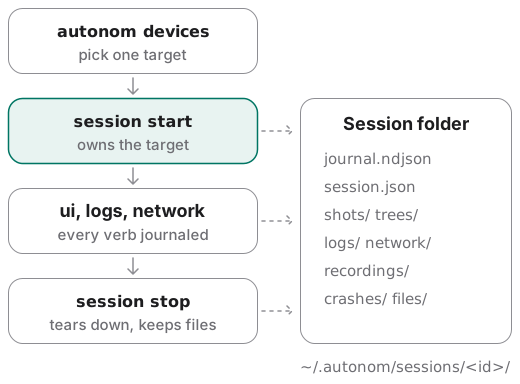
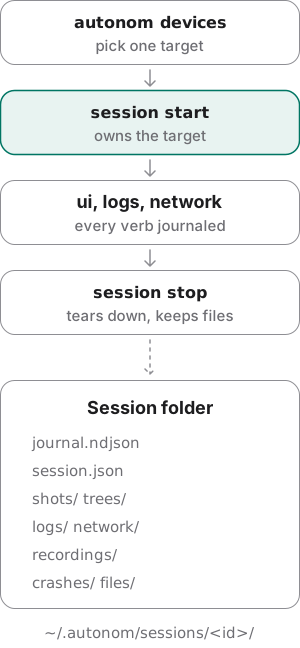
Sessions are machine-global. A second shell in any directory sees the same run, and a second session start is refused while one is live.
The journal records every verb, whether it worked, and your notes, with secrets masked. A reviewer reads what happened, not a summary of it. The screenshots and trees it names are the raw material of the evidence a run brings back, and each verb is one of the commands that read and drive the screen.
Examples
Every output here comes from Autonom’s test device, so you can rerun it without an emulator. Reproduce these outputs, at the end of this section, has the exact commands.
Pick a target when two are ready
Goal: bind the device you mean, not a guess.
- List the targets.
Android emulators and iOS Simulators come back in one list.
autonom devices - Start without naming one.
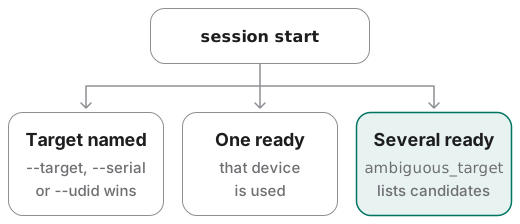
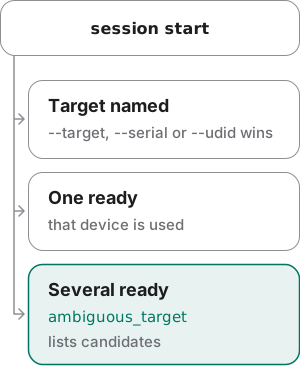
With two ready, Autonom refuses and names the candidates.
autonom session start
You should see two running emulators, a Simulator that is shut down, and a refusal.
What to look at. Both emulators are running, so session start exits 2 with ambiguous_target, an error code your agent can branch on. Pass one of the candidates to --target or --serial, as the next example does.
Show full output
Own a session and keep a note
Goal: bind one emulator, write down what you learned, and read it back.
- Start the session.
Name the target and the app under test.
autonom session start --serial emulator-5554 --app-id com.example.app - Write the finding down.
A note sits in the journal between the verbs around it.
autonom note add "login works; the 500 retry path is missing" - Read the notes back.
Filter the journal to notes only.
autonom journal --kind note
You should see the session’s folder, then your note with its place in the timeline.
What to look at. artifacts_dir is the folder that holds everything the session records. The note comes back as seq 2, right after session start.
Start over without losing the first run
Goal: stop the live session on purpose, because a second start never replaces it.
- Start a session.
This one is live until you stop it.
autonom session start --serial emulator-5554 --app-id com.example.app - Start again.
Autonom refuses and names the live session.
autonom session start --serial emulator-5554 --app-id com.example.app - Stop the first one.
Teardown reports each action, and the session’s files stay.
autonom session stop
You should see the refusal, then a stop that lists its teardown.
What to look at. The refusal, session_already_active, names the live session and its target. session stop reports every teardown action and never fails because one of them did.
Read a run back and hand it off
Goal: give a reviewer the whole timeline and the files to follow.
- Start the session.
The first entry in the journal.
autonom session start --serial emulator-5554 --app-id com.example.app - Read the screen.
The tree is saved with the run.
autonom ui tree --format outline --interactable - Note the finding.
Tag it with the task it belongs to.
autonom note add "login shows the generic error banner on 500; retry works" --task login - Read the timeline.
Every verb in order, whether it worked, and your notes.
autonom journal - List what can be followed.
Paths and hints for a second terminal.
autonom session outputs
You should see three entries in the order you ran them, and one stream to follow.
What to look at. The entries keep the order you ran them in, and the tree read names the file it saved under trees/. Paste shell_hint into a second terminal to follow the run live.
Show full output
Reproduce these outputs
From the root of an Autonom d0f7211 checkout, in bash or zsh. The autonom function runs that checkout against its test doubles, so no device is needed. Ids and times differ on every run.
Good to know
- Name the target whenever more than one is ready. Pass
--target,--serialor--udid. Ambiguity is an error that lists the candidates, never a silent guess. - A live session is never replaced.
session startrefuses until you runsession stop.journal --session-idstill reads a finished run. - A failed install or launch never leaves a session current. The new session is stopped, and the error names it in its
session_rolled_backfield. The next command cannot drive a half-built session. - The journal keeps secrets out. Typed text, secret-bearing flag values and every
KEY=VALUEoption value are masked. A journal error never fails your command. - A flag that does nothing says so.
--log-stream,--argor--setenvon Android and--activityon iOS come back as aflag_ignored_on_platformwarning. - Stop never kills what it did not start. An idb companion the session did not start is left alone, and a
companion_left_runningwarning names it. - A session that died still gets found.
autonom doctorlists orphaned processes and any device left pointing at a dead proxy.autonom cleanupreaps the processes from any directory. The network proxy is one of them.
Reference
Every command also takes --platform, --target, --serial and --udid, before or after the verb.
| Command | What it does |
|---|---|
autonom devices [list] | Lists Android and iOS targets in one list, plus bootable emulator images and their hardware profiles. --platform narrows it to one platform. |
autonom devices boot | Starts an emulator by --avd and waits for boot, or boots a Simulator by --target. |
autonom devices shutdown [--target ID] | Shuts a target down. It refuses any serial that is not an emulator. |
autonom session start [--app-id ID] | Owns one target. --install and --launch install and open the app; a shut-down Simulator boots on its own. |
autonom session show|stop | Shows the current session, or stops it and tears down what it started. |
autonom session outputs | Lists every file you can follow, with a tail -f hint for a second terminal. |
autonom session launch <app-id> | Launches the app. --fresh starts it on a cleared task on Android, or after a terminate on iOS. |
autonom session force-stop|uninstall | Stops or removes the app you name. |
autonom session clear <app-id> | Clears the app’s data; --strategy picks how. The differences below say how it varies by platform. |
autonom note add <text> [--task T] | Writes a note into the journal, tagged with its task. |
autonom journal [--kind action|note] | Reads the timeline back. --follow streams it; --session-id reads a finished session. |
autonom processes | Lists what Autonom started, across the machine. |
autonom cleanup [--dry-run] [--all] | Reaps what Autonom started and left running, across the machine. |
Android and iOS differences
One session per investigation. On iOS the target is the Simulator; a Simulator on another Mac is reachable through its idb companion.
| Capability | Android | iOS Simulator |
|---|---|---|
| Clear app data | A full reset with pm clear | Uninstall and reinstall, which needs the app path from --install; the privacy strategy resets permissions only |
| Boot | devices boot waits until the emulator has booted | session start boots a shut-down Simulator itself |
| Shut down | Emulators only, never hardware | By UDID |
| Launch options | --activity; --fresh starts on a cleared task | --arg and --setenv; --fresh terminates the app first; --log-stream on session start |
Next steps
You own a session and can read every step back.