Device state
Put the app straight into the state you want to test: a deep link, a permission, a location or a file. Each verb answers in JSON, so your agent checks what happened instead of assuming it.
Try it autonom open myapp://order/42
Needs a session on one target
How it works
Device state is everything the app reads but does not own: the link that opened it, its permissions, the location, the photo library and the files in its container. Autonom sets or reads each one with a single verb on the session’s target, and the session journal records the verb.
The answer says how far the change got. On Android, open names the activity that took the link in handled_by. location get compares what the system delivered with what the session requested. A simulator control reports verified: true only after it read the state back.

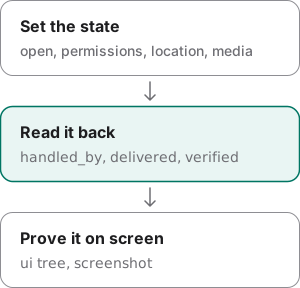
Then your agent proves the result where the user sees it: a UI tree and a screenshot of the screen the new state produced. A deep link that exits 0 may still have opened a browser or the system chooser, and handled_by tells that apart from a navigation bug inside the app.
Examples
Every output here comes from Autonom’s test emulator, so you can rerun it without a device. Reproduce these outputs, at the end of this section, has the exact commands.
Check which app took a deep link
Goal: learn whether a link reached your app at all.
- Open the link.
Android reports the activity that took it.
autonom open myapp://order/42
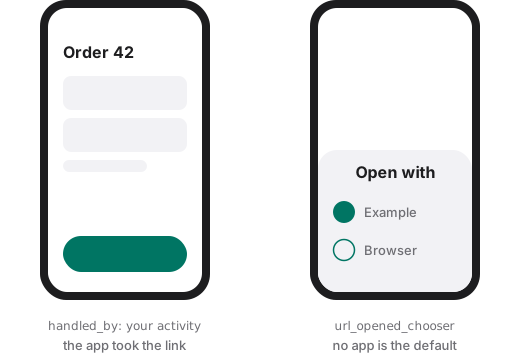
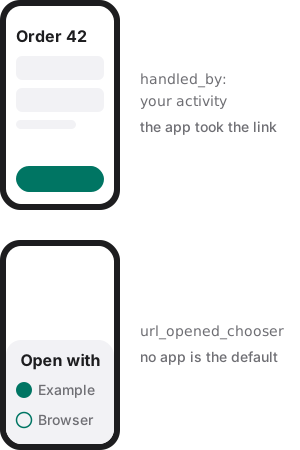
You should see ok true, yet a handled_by that names the system chooser.
What to look at. The command exited 0, yet handled_by is the system chooser and the warning is url_opened_chooser. The bug is the app’s intent filter or App Link verification, not a screen inside the app.
Show full output
Put the app into a hard-to-reach state
Goal: grant what a screen needs and give it a position, then check the position arrived.
- Grant the permission.
Android grants it with
pm grant; iOS usessimctl privacy.autonom permissions grant android.permission.CAMERA com.example.app - Set the location.
An emulator fix goes in through its console.
autonom location set 55.751244,37.618423 - Read it back.
A location you set is not yet a location the app received.
autonom location get
You should see the grant, a fix set through the emulator console, and a read-back that says it was delivered.
What to look at. delivery: on_subscription says the fix reaches the system only once an app asks for updates. delivered: true confirms the system’s last fix matches what the session requested. Then read the screen to see what the app made of it.
Look inside the app’s container
Goal: check the files the app wrote, without leaving its container.
- List the top level.
The app comes from the session, so no
--app-idis needed.autonom file ls
You should see the two folders at the top of the container.
What to look at. entries lists the container’s top level. A release or system app refuses with app_not_debuggable, an error code you can branch on, and file pull saves a file into the session instead of printing it, because app data can hold personal information.
Reproduce these outputs
From the root of an Autonom d0f7211 checkout, in bash or zsh. The autonom function runs that checkout against its test doubles, so no device is needed. Ids and times differ on every run.
Good to know
- Read
handled_bybefore you blame the app. If it names a browser or the warning saysurl_opened_chooser, the intent filter or App Link verification is the bug, not navigation inside the app. - iOS cannot say who took a link.
simctl openurlgives no answer, so iOS reportshandled_by: "unknown". Prove the result with a UI tree. - A location set is not a location delivered. On an emulator the fix reaches the system’s last known location only once an app requests updates. iOS has no read-back.
verified: truemeans the state was read back. Everysimulatorcontrol reportsverifiedandverification. An action a control does not have is refused withinvalid_simulator_actionand the valid list, before anything is sent.- A biometric match is never verified. Nothing reports whether a prompt consumed
biometric match, so it answersverified: false. Prove the effect from the app’s screen. - File access stays in the container. A path that escapes it is refused, and pulled contents are never echoed. On iOS,
file lstakes a directory such asDocumentsand the app’s bundle id. - Pick the smallest reset. On iOS,
session clearreinstalls the app;--strategy privacyresets permissions and keeps the data.
Reference
Each verb acts on the session’s one target and prints JSON.
| Command | What it does |
|---|---|
autonom open <url> | Opens a deep link. Android sends the VIEW intent with am start -W and names the activity that took it; iOS answers unknown. |
autonom permissions <grant|revoke|reset> | Changes a permission for a service and an app: pm on Android, simctl privacy on iOS, checked against the services this Xcode lists. |
autonom location set <LAT,LON> | Sets a simulated position. location clear works on iOS only: the Android emulator has no location reset. |
autonom location get | Reads the system’s last fix on Android and compares it with the requested one. iOS has no read-back. |
autonom media add <path> | Adds a photo or video to the device’s media library. |
autonom file ls [remote] [--app-id ID] | Lists files inside the app’s container. file pull copies one into the session, and its contents are never echoed. |
autonom session clear <app-id> | Clears app data: pm clear on Android; on iOS a reinstall, or --strategy privacy for permissions only. |
autonom session launch <app-id> | Launches the app: --activity on Android, --arg and --setenv on iOS. |
autonom simulator push <action> | Sends a push notification with push send; the app id comes from the session when left out. |
autonom simulator biometric <action> | Enrolls Face ID or Touch ID on the iOS Simulator and posts a match or a non-match. |
autonom simulator appearance <action> | Sets the system appearance, light or dark, and reads it back on both platforms. |
Android and iOS differences
Autonom drives Android targets over adb and the iOS Simulator. On Android, simulated location needs an emulator. The Simulator differs from a physical iPhone for camera, sensors, push, background execution and memory pressure; say so when it matters.
| Capability | Android | iOS Simulator |
|---|---|---|
| Deep link result | Names the activity that took it | Cannot tell: unknown |
| Permissions | pm grant, revoke, reset | simctl privacy |
| Simulated location | Partly: emulator only, read back | Yes, with no read-back |
| Clear app data | pm clear | Partly: reinstall, or permissions only |
| Clipboard read | No host-level read | Reads the pasteboard |
| Media and files | Yes | Yes |
Next steps
You can put the app into a state and check that it arrived.