Safety and errors
Every failure comes back with a stable code your agent can branch on. Risky steps need consent every time, and credentials are masked before anything reaches disk.
Try it autonom network start
How it works
A command prints one JSON document on stdout and exits 0. An expected failure prints one error object on stderr instead and exits 2. The object always has ok, error_code, error and hint.
Four streaming modes print one JSON object per line instead: flow run --events, logs follow, network requests follow and journal --follow. You opt in to each. tour --human prints Markdown for a person.
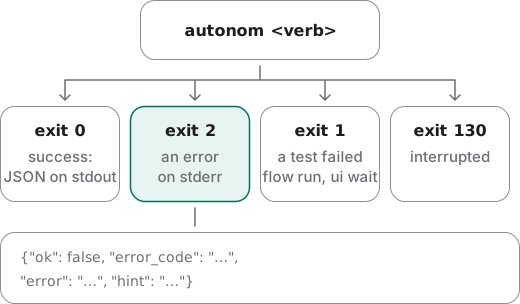
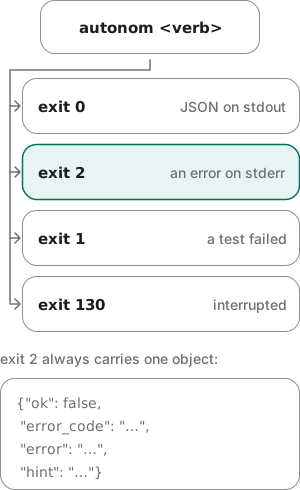
Your agent branches on error_code, never on the text. Codes may be added, but a code never changes meaning and is never removed. Every code the docs show is listed below.
Exit 1 means a test failed: a flow step, or a screen that never settled. doctor exits 0 even when tools are missing, unless you pass --strict. Exit 130 means you interrupted the command.
Warnings are softer. They sit in a warnings list, each with a code, and the command still succeeds.
Consent is asked every time
Some steps change trust or traffic: starting the network proxy, attaching a device, installing a CA. Each needs its own flag on every run. On an interactive terminal, you also type a confirmation phrase.
A refusal happens before anything runs, so a refused step changed nothing. No setting, file or earlier approval stands in for consent.
What stays protected
- Loopback only. The proxy listens on 127.0.0.1, with no flag to widen it. Mobile Canvas and
report servedo too. - Masked before written. Sensitive headers and credential-like body fields are masked at capture. The saved files never held them.
- Owner-only files. Only your user can read the network folder and flow files. Capture refuses a folder anyone can write to.
- Your Mac's settings stay put. Autonom never changes the Mac's own network settings.
- Teardown restores.
network detachputs back the exact proxy setting it found.
Examples
Every output here comes from Autonom's test device, so you can reproduce it without an emulator. The commands are in Reproduce these outputs, after the examples.
Branch on the code when the target is ambiguous
Goal: see what your agent gets when two emulators are ready and no target is named.
- Run any command that needs a target.
Autonom refuses to guess between the two.
autonom ui tree
You should see one error object on stderr, with exit code 2.
What to look at. ambiguous_target is the branch. candidates gives your agent the exact values to pass to --target.
See a privileged step refused, and kept on the record
Goal: confirm that a step without its consent flag changes nothing, and that the journal still shows it.
- Start a session.
The journal starts with it.
autonom session start --serial emulator-5554 --app-id com.example.app - Start the proxy without its flag.
The step is refused before anything runs, with exit code 2.
autonom network start - Read the journal.
Every command is recorded, refusals included.
autonom journal
You should see the refusal in the journal as ok: false with its code.
What to look at. The refused step is on the record, even if your agent never mentions it. The refusal itself, consent_required, names the flag to add. In the test run, the session's network folder stayed empty.
Show the refusal
Show full output
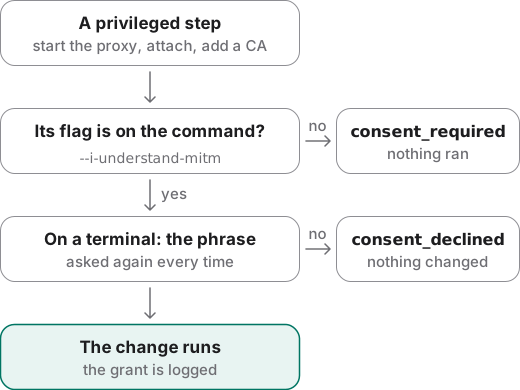
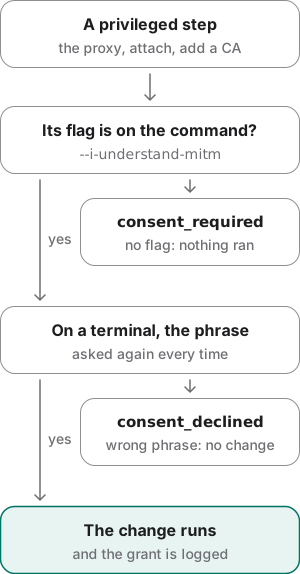
Read a validation error by its position
Goal: find the exact line that makes a flow file invalid.
- Check the flow file.
Line 9 asks for a match mode that does not exist.
autonom flow check flows/smoke.yaml
You should see the file, line and column, and a hint with the valid match modes.
What to look at. The error object adds file, line and column to the usual keys. The hint lists every valid mode, so the fix is one word: exact.
Show the flow file
Fail cleanly on a machine with no devices
Goal: see what a command says on a machine with no device tools at all.
- Take a screenshot.
There is no emulator, no Simulator and no adb.
autonom screenshot
You should see one error code and a hint, and no traceback.
What to look at. The hint names the next command. Your agent can follow it instead of guessing why nothing happened.
Reproduce these outputs
From the root of an Autonom d0f7211 checkout, in bash or zsh. Autonom's test device stands in for two emulators; --platform android keeps a booted Simulator out of the list. The last command runs on an empty PATH, like a machine with no device tools. Session ids and times differ on every run, and paths are shortened to … on the page.
Good to know
- Branch on error_code, never on the text. The message may change. The code does not.
- Exit 0 does not prove a tap changed anything. Compare before and after screenshots or trees.
- verified means read back.
verified: falsewithok: trueis a success whose effect is unconfirmed. - Consent is never remembered. An approval earlier in the same session does not carry to the next command.
- Credentials are masked before they are written. Not just before they are shown, so the files on disk never held them.
- A mocked screenshot is flagged. It carries screenshot_shows_mocked_data. Never present it as real backend behavior.
- Pinning is not bypassed. Use a debug build with certificate pinning relaxed, and say plainly when traffic cannot be read.
- Session files are sensitive. They live outside any repository, so no
.gitignoreprotects a copy. Delete them when the work is done.
Reference
The commands that gate, record and undo what Autonom changes.
| Command | What it does |
|---|---|
autonom doctor --strict | Exits 1, with ok: false and strict_failures, when the machine is not ready. |
autonom network start --i-understand-mitm | Starts the capture proxy. The flag is needed every time. |
autonom network attach --i-understand-mitm | Routes the device through the proxy. Installing a CA also needs --install-ca. |
autonom network detach | Puts the device's proxy setting back as it was. |
autonom journal | The session's timeline, failures and refusals included. |
autonom processes | Every process Autonom started on this machine. |
autonom cleanup | Stops leftover processes, each only after checking it still runs the recorded command. |
autonom session stop | Stops the proxy, the streams and the session's processes. |
xcrun simctl keychain <udid> reset | Removes a CA from a Simulator. network detach leaves it there on purpose. |
Error codes
Each code below appears in these docs. Your agent reads it from error_code in the error object.
ambiguous_selectorWhen: A selector matched more than one node, and the command acts on one.
Do: List the matches with
--all, then pass--indexor a tighter selector.ambiguous_targetWhen: More than one target is ready, and none was named.
Do: Pass one of the
candidateswith--target, or narrow with--platform.app_not_debuggableWhen: Android refused
run-as, so the app's files cannot be read.Do: Install a debug build of the app.
app_not_installedWhen: The app is not installed on the target, or no app id was given.
Do: Check the package id, or start the session with
--app-id.backend_failedWhen: A device tool that Autonom calls, such as adb, failed.
Do: Read
error. A CA install fails this way on a Play Store image; use another.consent_declinedWhen: On a terminal, the typed phrase did not match. Nothing changed.
Do: Run the command again and type the phrase exactly.
consent_requiredWhen: A step that changes trust or traffic ran without its flag. Nothing ran.
Do: Add the flag the hint names, such as
--i-understand-mitm.coordinate_space_mismatchWhen: A tap point lies outside the target's screen.
Do: Take the point from the tree's bounds, in points on iOS, or tap by selector instead.
element_offscreenWhen: The matched node is not on screen, so nothing was tapped.
Do: Scroll it into view, then select it again.
flow_assertion_timeoutWhen: An asserted element never appeared within the step's
timeoutMs.Do: Replay up to that step, read the tree, and check the label the screen really shows.
flow_file_not_foundWhen: A flow file does not exist at the path given.
Do: Check the path, then run
flow checkon it.flow_selector_invalidWhen: A selector in a flow file is malformed, such as an unknown match mode.
Do: Fix the line the error names; the hint lists the valid values.
invalid_simulator_actionWhen: A
simulatorcontrol got an action it does not have.Do: Pick one from
valid_actionsin the error.ios_hid_framework_missingWhen: idb's companion cannot load the Simulator's input framework, as on Xcode 27.
Do: Upgrade idb-companion, or install AXe.
no_matching_nodeWhen: No node on screen matched the selector.
Do: Read the tree and match what it says. The label may be in
--desc.no_targetWhen: No ready target was found, or a command needed an app id or target it did not get.
Do: Start an emulator or boot a Simulator, then run
autonom devices.physical_device_attach_unsupportedWhen: Network capture or a CA install was asked of a physical Android device.
Do: Use an emulator. A physical device cannot reach the loopback proxy.
selector_index_out_of_rangeWhen:
--indexis past the number of matches.Do: Count the matches with
--all, then fix the index.session_already_activeWhen: A session already owns the target.
Do: Stop it first with
autonom session stop.unsupported_capabilityWhen: The target cannot do what was asked, such as a capability a flow requires.
Do: Check what this machine and target support with
autonom doctor.unsupported_on_platformWhen: The command does not exist on this platform, such as pinch, rotate or shake.
Do: Run it on the platform that has it, or do the same thing another way.
usage_errorWhen: The command line is wrong: an unknown command or flag, or flags that clash.
Do: Read
hint; it holds the usage line.
Warning codes
A warning rides in the warnings list of a successful answer. The command still did its work.
companion_left_runningWhen: Stop found an idb companion the session did not start, and left it running.
Do: Stop it with
killif nothing else uses the Simulator.cpu_staleWhen: A CPU figure came from an old sampling window.
Do: Measure a series under a fixed flow before you make a claim.
flag_ignored_on_platformWhen: A flag does nothing on this platform, such as
--activityon iOS.Do: Drop the flag. The hint says why it has no effect.
label_is_in_descWhen:
--textmatched nothing, but the same value matches the description.Do: Retry with
--desc, as the hint shows.log_filter_degradedWhen: Logs could not be narrowed to the app by its uid, so a weaker filter ran.
Do: Launch the app first, or use a device on API 31 or later.
no_focused_fieldWhen: No field had keyboard focus, so the typed text may be lost.
Do: Tap the field first, then type, and confirm with
ui find.no_framesWhen: gfxinfo counted no frames, as for a Flutter app.
Do: For Flutter, summarize frame timings with
flutter-summary.override_path_missingWhen: An
AUTONOM_*override points at a binary that does not exist.Do: Unset it, or point it at a binary that exists.
persistent_mocks_activeWhen: Mock rules from earlier are still switched on, so matching responses will be faked.
Do: Review them, then run
autonom network mock disable --all.screenshot_shows_mocked_dataWhen: A screenshot was taken while a mock rule was active.
Do: Never present it as real backend behavior.
signal_unstableWhen: Pinned signal bars cannot be read back, or the pin was not sent again.
Do: If the pin was not sent, pin the status bar again before you capture.
sparse_accessibility_treeWhen: On iOS, fewer than three meaningful nodes were found.
Do: Add accessibility labels in the app, or fall back to a screenshot.
url_opened_chooserWhen: A URL opened the system chooser, not an app. The command still exited 0.
Do: Verify the App Link, or pick the app in the chooser.
Android and iOS differences
The two platforms differ in what capture can prove and what teardown undoes.
| Capability | Android | iOS Simulator |
|---|---|---|
| Network capture | Yes, through the emulator's host address | Partly: its traffic looks like your Mac's |
| A physical device | Refused, with physical_device_attach_unsupported | Not a target: Autonom drives the Simulator only |
| Installing a CA | Yes on an emulator; a Play Store image fails with backend_failed | Stays after detach, until you reset the keychain |
| Pinch, rotate, shake | Refused, with unsupported_on_platform | Refused the same way |
Next steps
You can read every failure by its code and know what consent protects.