Skills and routing
Your agent loads only the skills a task needs. It reads one map, routes to one stack, and adds device skills only when the running app must prove something.
Try it autonom doctor
Needs Autonom installed, with the skills
How it works
Autonom ships as plain SKILL.md files and one command line that prints JSON. Your agent reads the skills and runs the commands. It routes first and gathers evidence second.
Your agent starts with the autonom skill, a map of everything Autonom can do. Then project-router looks at the repository and narrows the map to one stack. A pubspec.yaml with a Flutter SDK means Flutter. Gradle settings mean native Android. An Xcode project, a workspace or Package.swift means native iOS.
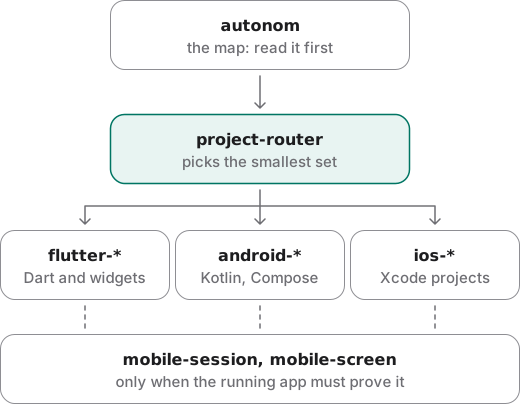
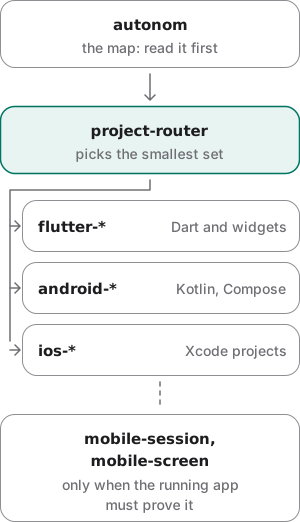
A repository with several stacks is routed by the layer being changed. Work in a Flutter app's ios/ folder goes to the iOS skills. Its Gradle files and platform channels go to flutter-android-platform.
The device skills join last, when the running app must show something. They drive a session on one target and read the screen.
Evidence second
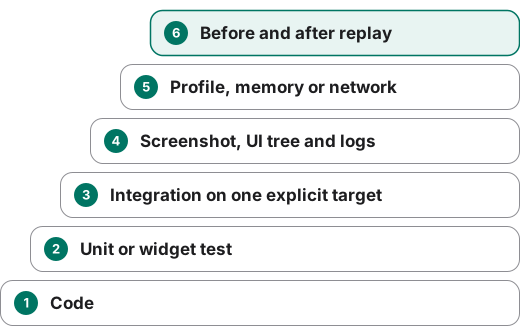
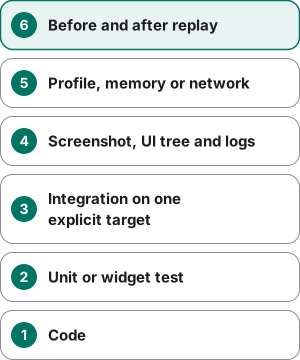
Once routed, your agent climbs the evidence ladder, from code to a before and after replay. A performance or memory claim needs comparable measurements.
At the end, your agent keeps four kinds of claim apart: measured facts, findings backed by code, hypotheses, and what is still unknown.
Examples
Route a Flutter bug before touching code
Goal: find which skills a Flutter bug needs, and which tool versions the repository really uses.
- Ask your agent to route first.
Say: “Route this repository, pick the smallest skill set, run the narrowest useful checks first, and report measured evidence apart from hypotheses.” It reads the
autonomskill, finds apubspec.yamlwith a Flutter SDK, and loads theflutter-*skills. - Let it snapshot the toolchain.
When the SDK or build setup is unclear, your agent runs
scripts/toolchain_snapshot.pyfrom your Autonom checkout on the repository and records what is declared and what is installed.
You should see the declared versions, what each local tool answered, and a closing line on policy.
What to look at. The last line is the policy. Your agent reports the exact versions it found and any error text, never a version it assumed.
Check what this machine can do before a device task
Goal: learn which platforms are ready before the task needs them, not halfway through.
- Ask doctor.
It checks every tool Autonom uses and says how each platform will work.
autonom doctor
You should see each capability with ready and what it needs. This run is from a Mac with Xcode 27; yours reports its own tools.
What to look at. ios_hid is not ready through idb, yet ios_ui is: its degraded line says taps go through AXe. Ready means installed, not proven.
Show full output
Give the skills to another agent
Goal: let any agent that reads SKILL.md folders use Autonom.
- Link the skills into the agent's skill folder.
Run it from your Autonom checkout. Links keep the skills current as you pull.
./scripts/install_skills.sh --link /path/to/agent/skills
You should see one line per skill, then a count of 24.
What to look at. Each skill lands as autonom-<name>, so it cannot clash with another pack. A reinstall first removes the old autonom-* entries, so a renamed skill does not linger.
Reproduce these outputs
From the root of an Autonom d0f7211 checkout, in bash or zsh. doctor reports the tools of the machine it runs on; this one had Xcode 27.0, adb, idb, AXe and mitmproxy. The other two outputs are examples, because they depend on your repository and your agent's folder; the install below, into a scratch folder, prints the same lines with real paths.
Good to know
- Read the map, then route. The
autonomskill says what exists.project-routerdecides what loads. - Do not load every skill at once. Loading only what the task needs keeps your agent focused.
- Read app memory before driving. Once an app id is known, your agent loads
mobile-memoryand reads what it learned about the app before it acts. - Never call a version the latest. Report the exact versions found and any error text. Check the official docs for version-sensitive work.
- Use the SDK the repository chose. When FVM pins Flutter, or the choice is unclear,
flutter_exec.pyruns the right SDK and never falls back silently. - Prove Flutter UI in Flutter. Widget tests, integration tests and a running app prove Flutter UI. Android views do not.
- Keep toolchain changes separate. A toolchain upgrade is its own change, apart from feature work. Do not upgrade everything to fix one conflict.
Reference
The helpers the skills call, and the installer that puts the skills where an agent finds them.
| Command | What it does |
|---|---|
python3 <plugin-root>/../../scripts/toolchain_snapshot.py . --execute | Records the declared toolchain and runs the local tools. |
python3 <repository-or-plugin-root>/scripts/toolchain_snapshot.py . --execute --json | The same snapshot as JSON. |
python3 <marketplace-root>/scripts/flutter_exec.py --root . -- --version | Runs the Flutter SDK the repository chose, FVM included. |
autonom doctor | Which platforms this machine can use, what is missing, and the fix. |
./scripts/install_skills.sh --link /path/to/agent/skills | Links every skill into an agent's skill folder. |
./scripts/install_skills.sh uninstall --link /path/to/agent/skills | Removes them again. |
make check | Checks the manifests and every skill, then runs the tests. |
All 24 skills
Each skill is one folder with one SKILL.md, summed up here from its description.
Core
autonom: start here: what Autonom can do, and the device loop end to end.project-router: classify the repository and load the smallest skill set.toolchain-doctor: inspect Flutter, Dart, Gradle, Kotlin, SDK and Java without calling any version the latest.autonom-setup: install Autonom on a new machine, or hand it to another agent.
Device
mobile-session: own one target, start its session and stop cleanly with its evidence.mobile-screen: read accessibility trees, find and tap by meaning, type and swipe.mobile-network: capture and mock HTTP(S) through a local proxy, with consent.mobile-flow: write, check and run repeatable flow files.mobile-memory: read and record what was learned about one app.android-emulator-browser: mirror an Android target or iOS Simulator in a browser: Mobile Canvas.
Android
android-debugger-agent: build, install, launch and debug on a named adb target.android-app-actions: deep links, verified App Links, shortcuts and intents through one typed model.android-project-setup: create or modernize native modules with Kotlin, Gradle and Compose.android-runtime-performance: Macrobenchmark, Baseline Profiles, Perfetto, Simpleperf and gfxinfo.android-memory-leaks: Java, Kotlin, native and process memory, from meminfo to retaining paths.compose-performance-audit: Compose recomposition, stability, lazy keys, layout and drawing.
Flutter
flutter-debugger-agent: build, launch, attach and debug with Flutter's machine output and the Dart VM service.flutter-testing: a layered test plan, from unit and widget tests to integration and native UI.flutter-performance-audit: separate build cost, raster cost, startup and image work.flutter-memory-leaks: Dart retaining paths, DevTools snapshots and disposal review.flutter-android-platform: the Android side of a Flutter app: Gradle, manifests, flavors, channels and plugins.flutter-release-validation: release candidates across flavors, signing and app size.
iOS
ios-project-setup: find the workspace or project, schemes, bundle ids and the built.app.ios-debugger-agent: build, run and debug on the Simulator through trees, screenshots, logs and crash reports.
Android and iOS differences
The skills are Flutter-first, with native Android and native iOS beside them.
| Capability | Android | iOS Simulator |
|---|---|---|
| Native project skills | android-* and compose-* | ios-* |
| Flutter debug and test skills | Yes | Partly: the iOS side of a Flutter app |
| React Native skills | Not yet shipped | Not yet shipped |
The Flutter VM Service is not shipped; the Flutter skills use DevTools in profile mode instead.
Next steps
You know how your agent picks its skills and what counts as evidence.